
A caregiver schedule app the adult child can actually keep up with.
One plan instead of forty messages.
In short
A caregiver schedule app keeps one plan the whole family opens: medications due, appointments, the handover between a helper and the siblings, and who is on call tonight. Easikin holds that plan in one place instead of leaving it across forty messages in a group chat.
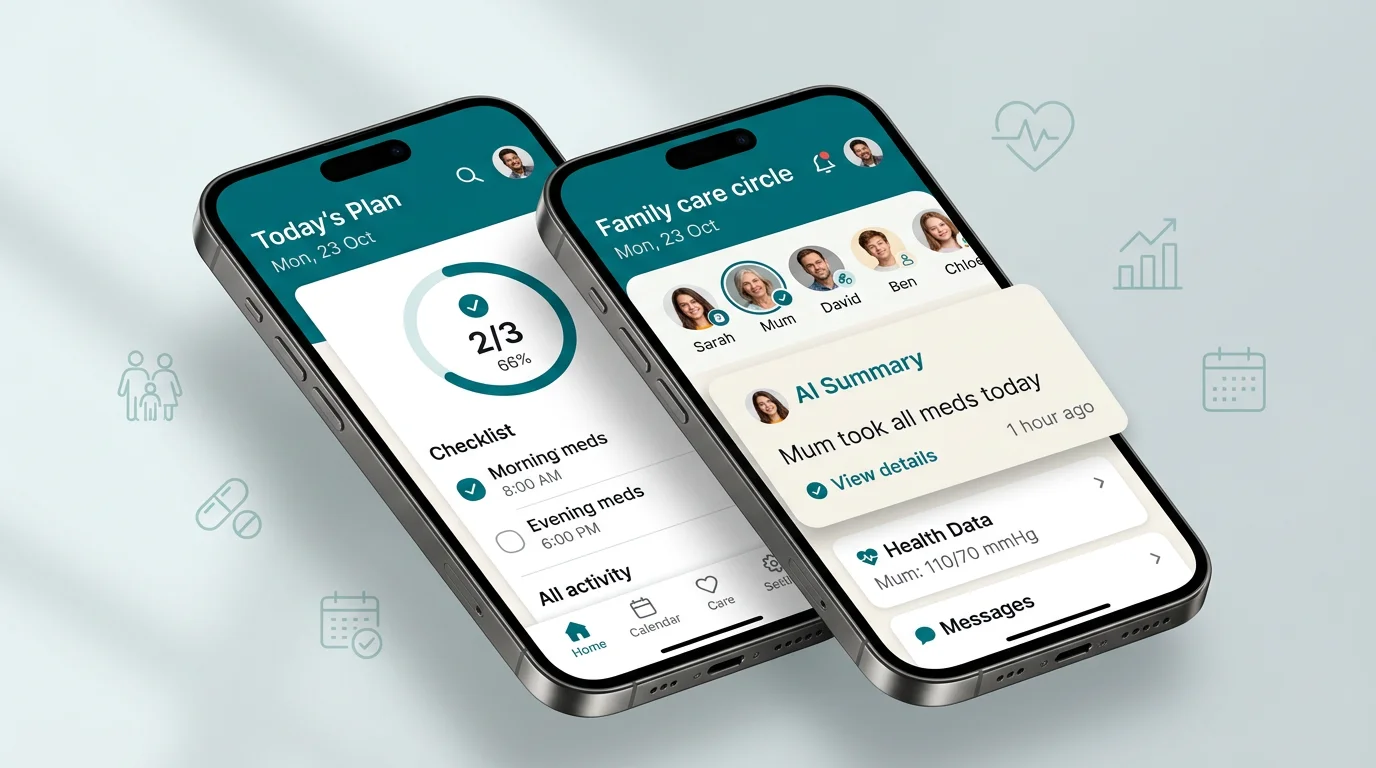
Easikin turns medications, appointments, discharge letters, handover notes and the family group chat into one daily plan the whole care circle can see: siblings, spouse, the domestic helper and whoever is on call tonight. Built for the person who is already holding it together in their head.
Visit the site: easikin.com(opens in new tab)
- iPhone first, Android after
- Scoped roles for helper and siblings
- Encrypted, not a medical device
Who carries the plan
The person who installs a caregiver app is usually not the person being cared for. They are the adult child with a full-time job, a parent two districts away and a sibling who means well. The app has to be useful to that person on a Tuesday, and it has to be usable by the helper who is actually in the flat at 7am. There is no B2B buyer for Easikin today: the product is sold to a family, and a paid helper is invited into that family's circle rather than bought for by an agency.
Adult children, 35 to 60 (B2C)
Employed, sandwich-caring, and the default contact for every clinic, insurer and helper agency. The plan in their head is the single point of failure that Easikin is trying to remove.
Siblings and spouses (B2C)
People who want to help and cannot see what needs doing. One shared plan ends the argument about who was told what, without making anybody the administrator.
Domestic helpers and paid carers (paid roles, invited by the family)
Invited with a scoped role: they see the day's tasks and log what happened, and they do not see the bank details or the family's private notes.
The signs your parent needs help arrive one at a time
Nobody becomes a carer on a Tuesday morning with a plan. It starts with a missed appointment, then a phone call about a fall, then a prescription nobody can read, then a hospital discharge with four pages of instructions and no explanation. Each event is small. What makes it hard is that nothing joins them up, and the person joining them up is a human being with a job.
- The medication list lives in three places: a plastic box, a clinic printout and a photo on somebody's phone, and they disagree.
- Handover between a domestic helper and the family happens verbally at the door, so anything unusual is lost by the time the adult child gets home.
- A discharge letter arrives with instructions that assume somebody is at home all day, and nobody reads it until the evening.
- Siblings ask what is going on and the answer is a screenshot of a group chat, which is not a record of anything.
- The caregiver burnout that everyone warns about is not caused by the tasks. It is caused by holding all of them in memory at once.
Four ways a family keeps the plan, and what each one loses
Most families already run one of these, and each one works until the week something changes. The comparison is about that week.
| Approach | Where the plan lives | What it does when a medication changes | Where it breaks down |
|---|---|---|---|
| A group chat | Forty messages, in the order people happened to send them | Somebody mentions it, and the mention scrolls away | Nothing is dated, nothing is searchable by task, and the helper who was not in the thread never sees the change. |
| A shared calendar | Appointments only | It does not: a calendar holds times, not what is due or what changed | Medication, handover and who is on call live somewhere else, so the family keeps two systems and trusts neither. |
| A paper notebook by the door | Whatever the helper wrote down that day | A line in the book, if the helper was told | The adult child reads it days later, the sibling abroad never reads it, and one lost book is the whole record. |
| Easikin | One daily plan: what is due, what changed overnight, who is on call | The new prescription is compared with the current list and the difference is shown | It is software: a family that will not open it on a Tuesday has bought nothing, and it does not give medical advice. |
An action layer for the family, not an archive
Easikin is not a folder of documents and it is not a medical record. It is the layer that answers three questions every morning: what is due today, what changed since yesterday, and who is on call. Everything else, from the prescription photo to the helper's note, feeds those three answers. The SI (Superintelligence) · AI (artificial intelligence) layer summarises what changed and drafts the questions to ask at the next appointment; the family still decides.
One daily plan
Every morning the care circle sees the same list: medications due, appointments, tasks, and the one thing to watch for today. It replaces the group chat as the place where the plan lives.
Capture from the phone
A photo of a prescription, a discharge PDF, a voice note after a consultation, a forwarded clinic message. Easikin reads it and turns it into tasks rather than storing it.
Scoped care circle
Siblings see the plan, the helper sees the day's tasks, a clinician sees what the family chooses to share. Roles are set once and logged.
Handover that survives the door
A short end-of-shift note from the helper or the night carer, attached to the day rather than sent into a chat, so the next person reads it in context.
What is in the build
Easikin is in development with an early-access list, and the list below describes what the build being shown actually does.
Daily plan
What is due, what changed, who is on call. The screen a family opens first and closes last.
Medication list with changes flagged
Photograph a prescription and Easikin compares it against the current list, then shows what changed rather than a second list to reconcile by hand.
Appointment record
Who, when, where, and what was said, plus the questions the family wanted to ask, carried from the last visit.
Document capture
Discharge letters, insurance letters and clinic printouts, read and attached to the right episode.
Voice note to tasks
Speak for a minute after a consultation; Easikin transcribes it and proposes the follow-ups for the family to accept or delete.
Scoped roles
Helper, sibling, spouse and clinician each get a view rather than the whole picture, with an access log.
The capability list, with the honest status
A caregiver app is easy to over-claim. This table separates what the build does from what it deliberately does not.
| Capability | What it means in practice | Status |
|---|---|---|
| Daily plan | One list of what is due today, shared by everyone in the care circle. | Available in the demo build |
| Medication change flag | A new prescription is compared with the current list and the difference is shown. | Available |
| Helper and sibling access | Scoped roles, invitation by the family, and a log of who opened what. | Available |
| Handover note | An end-of-shift note attached to the day, not lost in a chat. | Available |
| Voice note transcription | A one-minute note becomes text and proposed follow-ups. | Available |
| Medical advice | Easikin does not diagnose, dose, or tell a family to change a medication. | Not offered |
| Emergency dispatch | No call to an ambulance service; the family's own emergency plan is what runs. | Not offered |
| Clinical record | This is not the home's or the clinic's record of care, and it does not replace one. | Not offered |
From a group chat to a plan in four steps
Setting up takes one sitting, and the first useful output is not a library of documents; it is tomorrow morning's list.
- 1
Open a care circle
Add the parent, then invite the people who already help: siblings, spouse, the helper. Each gets a role, which decides what they can see.
- 2
Photograph the current state
The medication box, the last clinic letter, the appointment card. Easikin turns them into a list rather than a pile.
- 3
Follow the daily plan
Each morning: what is due, what changed overnight, who is on call. The helper logs what happened; the family reads it in context.
- 4
Bring the questions to the appointment
The plan carries the open questions from the last visit, so a ten-minute consultation starts with what the family actually needed to ask.
What setting it up takes, and what it does not cover
Setup is one sitting, and the questions that follow are about who sees what and where the product stops.
Deployment and staff training
Setup is one sitting with the person who holds the plan: add the parent, invite the helper and the siblings, photograph the medication box, the last clinic letter and the appointment card. Roles are set once, and the first useful output is tomorrow's list rather than a completed archive. The helper's briefing is the smallest part on purpose: read the day's tasks, add two lines at the end of the shift. Asked for more, a helper stops doing it. A family that wants the sibling abroad to read rather than act gives them the read-only role, and nobody needs training to use a plan.
Data privacy and the PDPO
A care record holds health information about a parent who may not be the person who installed the app, so consent is part of the product rather than a footnote. The parent's agreement is what the care circle is built on, the helper sees the day and the handover and not the family's financial notes, and every open is logged. Data is encrypted in transit and at rest, the family can export and delete its circle, and the app writes nothing into any clinic record. Under the Personal Data (Privacy) Ordinance the family is holding personal data about somebody else, and the scoped roles exist to keep that to what each person needs.
What is included, and what is not
Included: the daily plan, the medication list with changes flagged, appointment records, document capture, voice notes turned into tasks, scoped roles and the handover note, with a free tier that does not expire and the paid tiers published in the buyer's guide above. Not included: medical advice, dose adjustment, diagnosis, emergency dispatch, a clinical record, a fall alarm, or any monitoring of the parent. Those are other products, and in an emergency they are other services.
Hong Kong aged-care tech watch
When a subsidy, a policy or a care-home rule changes, you get one clear note.
We read the HK policy papers, subsidy circulars and care-home notices, then send one short note when something actually changes: what changed, who it affects, and what to do next. No fixed schedule — if nothing moves, you hear nothing.
Compared with a shared calendar and a group chat
The alternatives are free and already installed. The comparison is about what happens on the day something changes.
| Features | Easikin | The usual alternative |
|---|---|---|
| One plan instead of several threads | Yes | No |
| Medication changes flagged against the old list | Yes | No |
| Scoped roles for helper and siblings | Yes | Partial |
| Handover note attached to the day | Yes | No |
| Reads a discharge letter into tasks | Yes | No |
| Medical advice or diagnosis | No | No |
| Works without a smartphone | No | Yes |
What families ask before installing it
These are the questions that come up when a family is deciding whether this is another app to maintain or the thing that replaces the group chat.
What should a caregiver app do in the first week?
One thing well: hold the plan. In the first week a family should be able to answer what medication is due, which appointment is next, and who is covering Thursday, without scrolling a chat. If an app cannot do that in week one, the family will not still be using it in week six, whatever else it promises.
What does it cost?
There is a free tier with one care circle, the calendar and basic reminders. Pro is US$14.99 a month or US$119.99 a year and adds the document capture, the change summaries and family invites. Family+ is US$24.99 a month or US$179.99 a year for up to three care circles and the dementia behaviours pack. The packs are sold separately, and the free tier is not a trial that expires.
What does the domestic helper have to do?
Read the day's tasks and add a short note at the end of the shift, in Chinese or English. That is the whole ask, and it is deliberately small: a helper who is asked to fill in a form will stop, and a helper who is asked to write two lines will keep going. The helper sees the day and the handover, not the family's financial notes.
What does Easikin not do?
It does not give medical advice, adjust a dose, diagnose anything or dispatch help. It is not a medical device and it is not the care home's record. It does not watch the parent, and it does not tell a family whether a symptom is serious; it makes sure the symptom is written down and the right question reaches the right clinician.
Will my siblings actually use it?
The ones who wanted to help and could not see what to do usually will, because the app gives them a task rather than a status. The ones who will not are not persuaded by software, and the plan still works: the person running the day keeps the record, and the others can read it when they ask.
Does it work if the family is spread across countries?
Yes, and that is a common case in Hong Kong: one child here, one abroad, a helper in the flat. Roles are per person rather than per household, so the sibling abroad can see the plan and the appointments without being the one who has to act on them.
The questions this page is written for
Short answers to the queries behind this page. The longer answers sit in the buyer's guide above.
- What is a caregiver daily log?
- A short, dated record of what happened on a shift: what was eaten, what medication was taken, what was unusual, who visited. It exists so the next person does not start from memory. Easikin keeps it attached to the day rather than to a chat thread, which is what makes it readable a week later.
- What are the signs a parent needs more help?
- The ones that repeat: missed appointments, an unchanged medication box, weight loss nobody mentioned, a fall that was reported late, post that has not been opened. One of them is a bad week; three of them is a pattern. Easikin does not diagnose the pattern, but it does make the pattern visible, because the log is dated and shared.
- Can my helper and my sister use the same app?
- Yes, with different roles. The helper sees the day's tasks and adds the handover note; the sister sees the plan and the appointments. Neither sees the other's private notes, and the family decides who is invited.
- Does Easikin tell me if my parent is getting worse?
- No, and it should not claim to. It records what the family and the helper noticed, and it surfaces changes in that record. Whether a change is deterioration is a clinical judgement, and the app's job is to make sure the clinician sees it.
- Is it available in Chinese?
- Yes: traditional Chinese, simplified Chinese and English, with the interface language set per person rather than per family. A helper reading traditional Chinese and a sibling reading English can share one plan.
- Can a caregiver app replace the domestic helper?
- No. The helper is in the flat and the app is not. Easikin gives the helper somewhere to write what happened and gives the family a way to read it without a phone call at the end of a shift. The product assumes a person is doing the caring and tries to stop the record of it living in one person's memory.
Further reading
The published notes that go with this product — written for the same operational questions, with the sources shown.
- Caregiver App: What to Log for Elderly Parents
A caregiver app earns its place by recording six things: medication, meals, mood, falls, appointments and supplies. What to log, and who types it.
- Handover Notes Template: Five Things to Pass On
A handover notes template with five fields: what happened, what changed, mood and mobility, what comes next, and what runs out. Ten minutes, spoken and written.
- Stroke Rehabilitation in a Care Home: The First Month
What happens when a stroke patient leaves hospital in Hong Kong, what a care home must be able to do, the questions to ask, and the first-month review.
- Weight Loss and Malnutrition in Care Homes
Weight loss and malnutrition in care homes: the screening thresholds, mealtime observation, food fortification and the records that trigger a referral.
The other three products
The plan is one of four jobs. The same household usually also has a fall risk, an activity hour to fill, and a drawer of documents nobody has mapped.
Steadicore
Fall detection and risk software that reads the cameras a home already runs, with no wearable and no facial recognition.
Legaris
A map of an ageing parent's important documents, including the will and the enduring power of attorney, before a crisis needs them.
Sanospark
Brain games for older adults that an activity worker can run in ten minutes, with a session record for the care review.
Get the plan out of your head
Join the waitlist and we will send the first-week checklist: the six things worth photographing before the next appointment.